

Category details: account-based costs
Use separate expense-account lines for costs such as rent, repairs and cleaning. Several captured lines can have different accounts and tax treatment without creating Product/Service records.
Capture supplier invoice lines and export account-based costs as Category details or product-based purchases as Item details. Datamolino supports both approaches, so the invoice workflow can fit the records your business needs.
14 days free, no payment details needed.
A detailed invoice does not always need product records. Choose the line type for the accounting job.
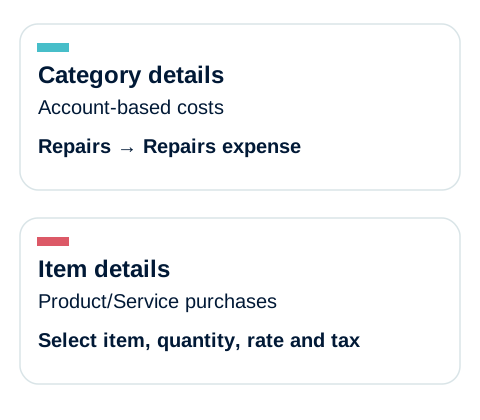
Two supported QuickBooks purchase line types: choose expense-account coding or existing Product/Service records for the job.
Use separate expense-account lines for costs such as rent, repairs and cleaning. Several captured lines can have different accounts and tax treatment without creating Product/Service records.
Use existing QuickBooks products or services where that identity matters. Select Items as the Purchase item type in Datamolino, choose the Product/Service and check the quantity, rate and tax.
Export detail and purchase item type control different parts of the resulting transaction.
Use a line-item subscription and select Line items as the export detail. This sends the invoice breakdown rather than just the total or tax summary.
Use the account-based configuration for Category details, or choose Items for Product/Service coding. Set the appropriate coding for each captured line.
Inspect the exported bill in the correct company. Check accounts or Products/Services, quantity, rate, tax and any reporting fields. Test mixed invoices and purchase-order associations separately.
The invoice supplies the description and amount. Your team supplies the accounting treatment. Datamolino can repeat the decisions you already made.
For an exact description match from the same supplier, Datamolino reuses the coding from the last exported matching line unless a higher-priority rule applies. The exact description matters: a changed reference can stop that match.
Set your own Begins with, Ends with or Contains conditions. For example, Contains “Office rent” can match “Office rent September” and “Office rent October”. Require all conditions or at least one, and test intended matches and false matches.
Supplier keyword rules take priority over folder keyword rules. Review new descriptions and changed purchases before export. The available coding fields depend on the connected accounting system.
Keep the document flow separate while your QuickBooks company holds the accounts.
Connect several folders to the same QuickBooks company. Each has its own email address, members and supplier coding rules.
Explore multi-site workflowsClass, Location and Customer fields appear according to the settings enabled in QuickBooks. Their availability depends on the company configuration, subscription and region. Check the exported result.
Enable invoice approvals for the folders that need them. Let the site manager confirm the purchase while finance handles the accounting, using the documented editing and export settings.
Configure the approval handoverChoose a subscription with line-item extraction when you need individual invoice lines. Totals-only plans do not include it. The pricing page lets you compare the options for your document volume.
Yes. It supports account-based Category details and Product/Service-based Item details in QuickBooks Online. Choose the appropriate export configuration. That does not mean every mixture of both line types can be created through one configuration; test your mixed bills.
A Product/Service export does not establish purchase-order matching. If linking to an existing PO or updating inventory is required, include it as a separate check in your trial.
They appear only where the corresponding QuickBooks company settings are enabled. Check the settings and plan before configuring the Datamolino folder.
Yes. Multiple Datamolino folders can connect to the same Xero organisation, QuickBooks Online company or FreeAgent account. Each folder has its own document intake, members and settings. A business account is for one accounting company; a practice account can serve multiple client companies.
Watch a short demonstration, then follow the written guide for the details.
We will show how each line type is configured, how repeat coding works and what to inspect in the exported QuickBooks bills.