Switch from ApprovalMax when invoice sign-off is all you need
Possibly, if your requirements are invoice capture, coding and purchase sign-off. Datamolino includes optional invoice approvals. Compare your wider purchasing controls, document volumes and line-item needs, then pilot one folder before changing the live process.

Start with the approvals your business actually needs
Your business may need someone to confirm a supplier invoice and its amount, with finance handling the accounting. If that is the job, Datamolino’s included invoice approvals may let you keep capture, coding and sign-off in one subscription.
List the controls you use in ApprovalMax today, including any purchase-order matching, budgets, substitutes, vendor approvals and payment-release processes. Review them against the Datamolino and ApprovalMax comparison. ApprovalMax now includes native Capture, so a fair comparison considers both products’ current capture and approval capabilities.
Datamolino is a candidate when you need folder-based capture, saved line coding, configurable approval stages and an accounting export. If broader purchasing or payment controls are essential, test how those requirements will be met before replacing the existing workflow.
Compare your actual monthly cost
Use the same country, tax basis, invoice volumes, line-item requirements, accounting companies and billing term on both sides. Check your own contracts and current pricing rather than assuming the public starting price is your bill.
If you already pay for both Datamolino and ApprovalMax, the question is whether the included Datamolino approval workflow covers the work done in the separate subscription. If you use ApprovalMax Capture alone, compare the full cost of moving capture and approvals into Datamolino.
| Cost to include | What to check |
|---|---|
| Capture | Document volume, extraction detail and overage charges |
| Invoice approvals | Organisation or usage limits and the required features |
| Line-item processing | A Datamolino line-item plan, rather than totals-only pricing |
| Accounting companies | Business or practice account fit |
| Other charges | Payments, additional tools and transition costs where applicable |
| Contract | Monthly or annual commitment and renewal or cancellation terms |
Potential saving = subscriptions and charges you can actually remove, less the full replacement cost. Savings depend on the workflow and workload; they are not guaranteed. Use current Datamolino pricing and the dated pricing context on the comparison page.
Build one pilot folder
Choose one site, project or client with a manageable invoice flow. Create or select its folder and connect it to the correct accounting organisation. Invite the people who supply documents, approve purchases and prepare the books.
Several folders can connect to the same Xero, QuickBooks Online or FreeAgent organisation. A business account serves one accounting company; a practice account can serve several client companies. Folder names organise the work; supported accounting fields identify the site or project in the ledger.
Enter the supplier coding and approval setup needed for the pilot. This is a configured transition, not an automatic import of ApprovalMax matrices, rules or historical approval records.
Set purchase sign-off and accounting responsibilities
Choose the approvers and stages in the pilot folder. Use Any when one assigned person can complete a stage or All when everyone must sign. Set the route conditions and review the Default path.
For client approval followed by bookkeeping, follow the coding-after-approval guide. It covers stage edit permissions, Keep documents editable, access roles and leaving automatic export off until finance has reviewed the result.
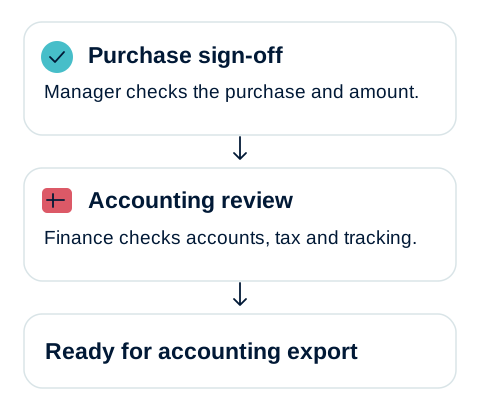
The client or manager confirms the purchase and amount. Finance checks the supplier, accounting codes, tax and supported tracking fields. Approval is not payment, and accounting review still has an owner.
Test the complete handover
Run a routine invoice, a detailed invoice and a rejection through the pilot. Check who can see each document, who can edit, which route applies and what reaches the accounting software. Include a changed description and a bill needing allocation if those are normal in your business.
If your current setup uses Datamolino → Xero → ApprovalMax, review the Datamolino export status and the active ApprovalMax bill workflow before cutover. For the pilot, agree one approval route and avoid submitting or exporting the same invoice through both routes. With approval completed in Datamolino, a Xero bill can be exported as Awaiting Payment when that fits your process.
Cut over at an agreed boundary
Agree which system owns invoices already awaiting approval and which handles new invoices from the cutover date. Finish or deliberately re-route open work, update supplier email destinations, and tell approvers where to act.
Retain the historical invoices and approval evidence your business requires. Confirm how to retrieve records from the previous service before cancelling its subscription. Verify the first exported bills and review the actual subscription costs after the switch.
Book an approval workflow demo with your existing setup, or see how Datamolino and ApprovalMax can work together if you still need the specialist controls.